Adding Custom Domain Inside Vercel
Vercel provides all deployments with a vercel.app URL, which enables you to share Deployments with your Team for collaboration. However, to provide greater personalization and flexibility to your project, you can instead add a custom domain.
Add and configure domain
-
Login to vercel dashboard.
-
Pick the project to which you would like to assign your own custom domain.
-
Click on
Settingstab. -
Then select
Domainsmenu item. -
Now click on
Add Domainbutton.

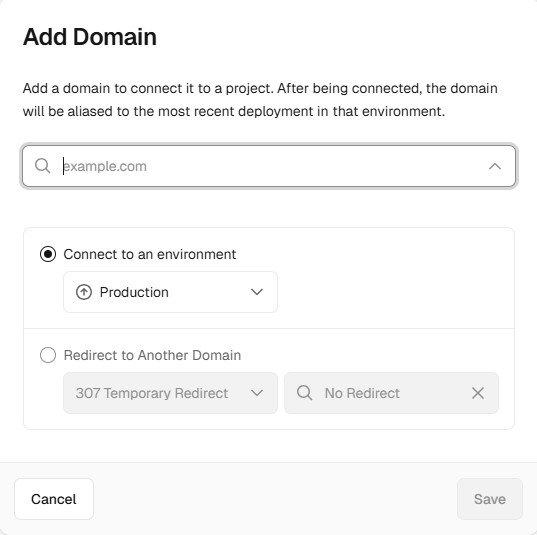
- Input the domain you wish to include in the project and click on save button.
Make sure that the environment is set to be Production.
See below reference image.
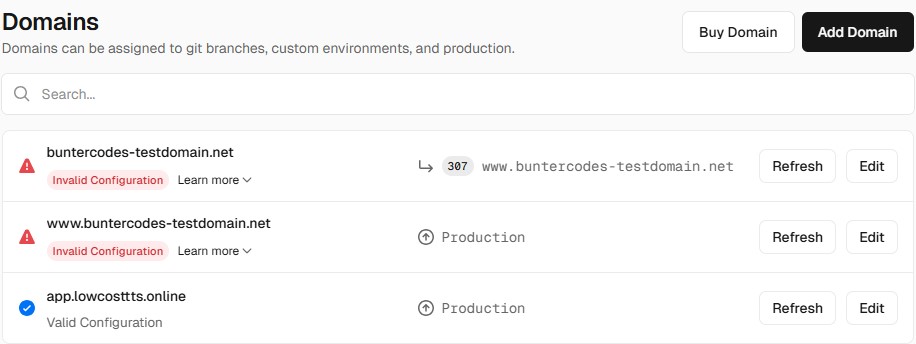
- Now you can see that domain has been added but it requires verification.
Verifying Domain (Hostinger as an example)
Now you need to verify the domain by adding an A record .
Follow below steps:
-
Click on
Learn moredropdown menu. -
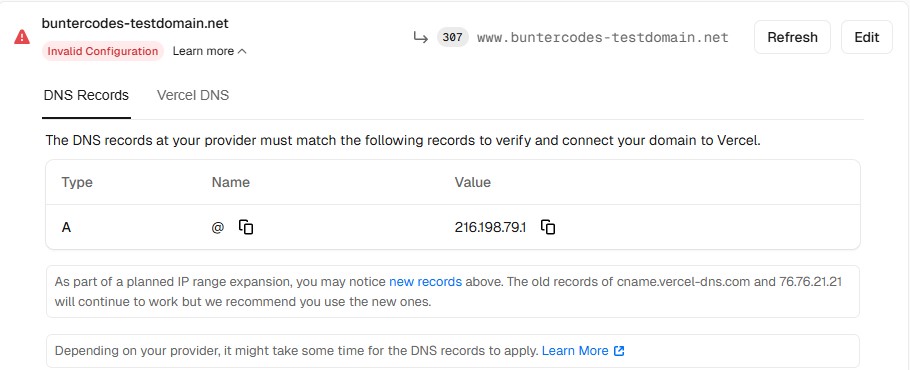
A details will appear like below:
-
Login to Hostinger hpanel https://hpanel.hostinger.com/ .
-
Select your domain.
-
Go to Advanced section and then select
DNS Zone Editor -
Add a new
A recordas follows:
From above image we can see that we need to use following records:
-
Type = A
-
Name = @
-
Value = 216.198.79.1
-
TTL = 14400
If your configuration is correct, the domain verification will be completed and you will see Valid Configuration status under your domain.
But still if you face any error, contact us via Discord Server.