Add Project Inside Vercel
-
Login to Vercel dashboard.
-
Click on right side
Add Newbutton.
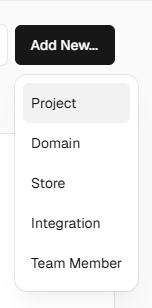
- Then choose
Projectoption.
note
Now if you have already signed up Via GitHub, then you can see that your github account is already connectd and showing all of your repos.
Otherwise you need to install github app and then connecting your github account to it.
-
Now select the correct repo which contains your app code and click on
Importbutton. -
Now at this point make sure that:
HELp
-
Framework Preset is set to be
Next.jsas your app is built in Next.js framework. -
Set project name or go with default generated name (as you decide).
- Final step is to click on
Deploybutton.
info
This step will take some time. if got any error, then check logs to understand what causing build issue.