Set Bucket Permissions
IMPORTANT TO KNOW
After creating storage bucket, it is necessary to setup Permissions to restrict unauthorized access to that storage bucket and its files or folders.
Permissions setup:
- Selet the storage bucket. For example
AUDIO_FILES. - On top left. you can see the 3 tabs. Click on
Settingstab. - Inside Permissions section, remove all default roles as we will setup our own
- Now click on
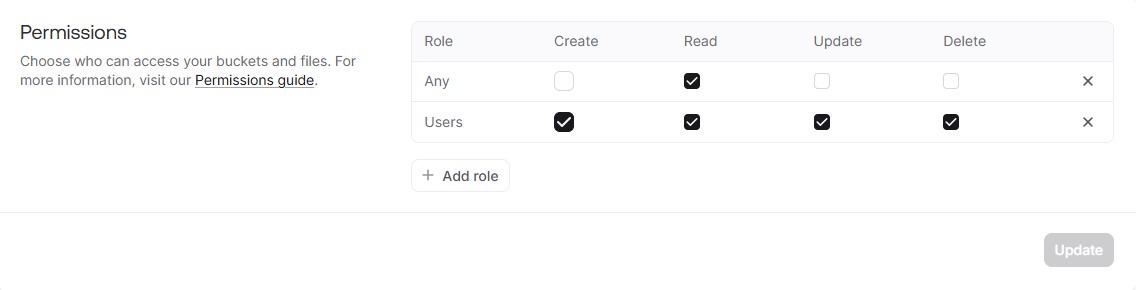
Add rolebutton and then click on "ANY" option.- Check mark only
READpermission. (We only need this). - Leave blank rest permissions like CREATE, UPDATE and DELETE.
- Check mark only
- Now again click on
Add rolebutton and then click on "All users" option.- Check mark all of the permissions.
- Click on update button.
- THATS'it.
Reference Image to understand well