Setup .env.local file
To correctly use environmental variables inside our app, we have to setup the new separate file inside our project called .env.local that holds all of the environmental variables inside it.
First Step:
To get started, you will need to create a .env.local file in the root directory of the project. Just follow below steps:
1- Go to your project root directory/folder, as described in below image.
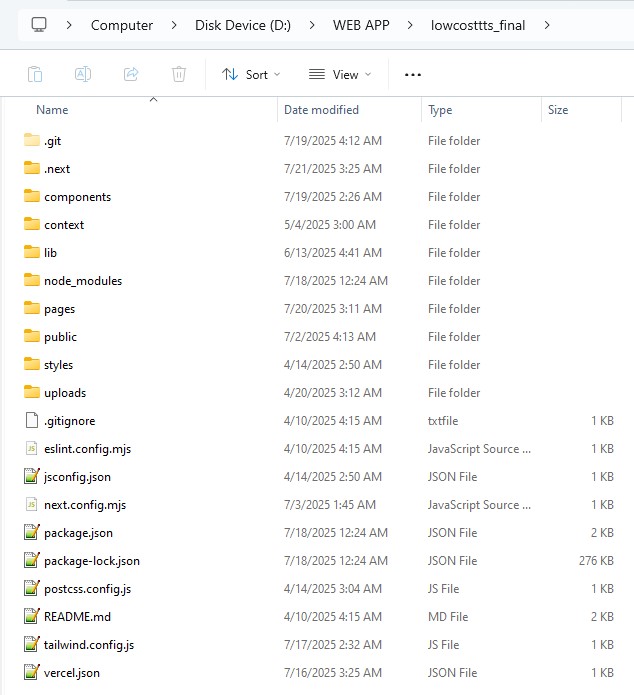
2- Here create a new file and name it as .env.local
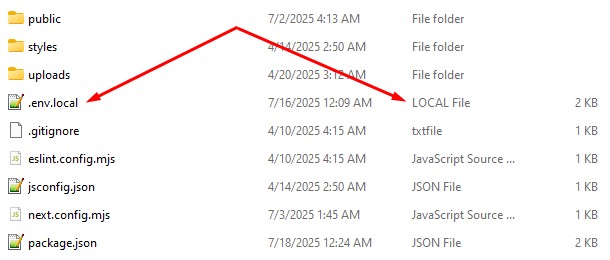
warning
-
As described in above image, the file extension should be of
LOCALfile and name should start with. -
So the .env will be the name and .local will be the file extension
Second Step:
Copy beow environmental variables and paste them inside recently created .env.local file.
# Client (Browser) access

NEXT_PUBLIC_APPWRITE_ENDPOINT=
NEXT_PUBLIC_APPWRITE_PROJECT_ID=
NEXT_PUBLIC_APPWRITE_DATABASE_ID=
NEXT_PUBLIC_BASE_URL=
FISH_AUDIO_API_KEY=
FISH_AUDIO_API_BASE_URL=
FISH_AUDIO_SPEECH_MODEL=

# Here add Appwrite Collection Ids
NEXT_PUBLIC_APPWRITE_USER_PROFILES_COLLECTION_ID=
NEXT_PUBLIC_APPWRITE_HISTORY_COLLECTION_ID=
NEXT_PUBLIC_APPWRITE_USER_MODELS_COLLECTION_ID=
NEXT_PUBLIC_APPWRITE_BROWSE_MODELS_COLLECTION_ID=
NEXT_PUBLIC_APPWRITE_SUBSCRIPTIONS_COLLECTION_ID=

NEXT_PUBLIC_APPWRITE_STORAGE_BUCKET_ID=

NEXT_PUBLIC_APPWRITE_PROJECT=

CREEM_API_BASE_URL=
CREEM_API_KEY=
CREEM_WEBHOOK_SECRET=

# Server-only access
APPWRITE_API_KEY=

#For new user account
NEXT_PUBLIC_CHAR_ALLOWED=
NEXT_PUBLIC_CHAR_REMAINING=

# Creem Product IDs
NEXT_PUBLIC_CREEM_STARTER_MONTHLY_PRODUCT_ID=
NEXT_PUBLIC_CREEM_STARTER_YEARLY_PRODUCT_ID=
NEXT_PUBLIC_CREEM_PRO_MONTHLY_PRODUCT_ID=
NEXT_PUBLIC_CREEM_PRO_YEARLY_PRODUCT_ID=
NEXT_PUBLIC_CREEM_TURBO_MONTHLY_PRODUCT_ID=
NEXT_PUBLIC_CREEM_TURBO_YEARLY_PRODUCT_ID=